

JBL - Subwoofer Model Basspro Nano


ABOUT THE MANUAL
This manual displays general Owner’s Manual guideline. However,
please note that proper installation of mobile audio components
requires qualified experience. If you do not have the knowledge
and tools to successfully perform this installation, we strongly
recommend consulting an authorized JBL dealer about your
installation options. Keep all instructions and sales receipts for
reference.
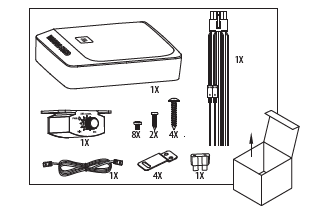
WHAT’S IN THE BOX
MOUNTING THE BASSPRO NANO
Recommended location: under the passenger seat
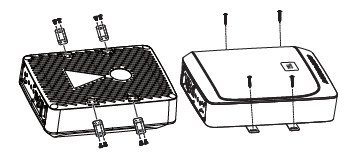
NOTE: Before securing the BassPro Nano with mounting screws,
check beneath the mounting surface to ensure you will not
puncture fuel lines, brake lines, or any vehicle wires. Also ensure
that the BassPro Nano will not interfere with seat operation or
wiring, or block underseat heater/air conditioning vents.
WIRING FOR POWER AND GROUND

WIRING FOR AUDIO SIGNAL
Line-level from aftermarket stereo

NOTE: When connecting an aftermarket stereo to the BassPro Nano's line-level inputs and remote turn-on wire, set the AUTO TURN ON button to OFF.
Speaker-level from factory or aftermarket stereo


NOTE: When connecting a factory or aftermarket stereo to the BassPro Nano's speaker-level inputs, set the AUTO TRUN ON button to ON.
SETTING GAIN, ADJUSTIG PHASE LOW-PASS FILTER, AND BASS BOOST

CONNECTING THE REMOTE BASS CONTROL MODULE

SPECIFICATIONS
- Driver Complement 6" x 8" (152mm x 203mm) woofer
- Amplifier Power Output: 100WRMS, 200W Max
- Frequency Response: 30 HZ - 150 HZ
- Fuse: 15A
- Maximum Current Draw: 13A
- Quiescent Current Draw: <600 mA
- Input Sensitivity: 0.1 V - 4.0 V low-level inpuut; 0.25 V -10 V high-level input
- Crossover Frequency: 5- Hz - 150 Hz
- Crossover Slope: 12 dB/octave
- Bass Boost: 0 dB to + 12 dB @ 50Hz
- Dimensions (L x W x H); 10-1/4" x 7-11/16" x 2-15/16" (260mm x 195mm x 74.6mm)
- Weight: 7.78lbs. (3.53kg)
TROUBLESHOOTING
No audio and POWER indicator is off
- No voltage at BATT+ and/or terminals, or bad or no ground connection. Check voltages at amplifier terminals with VOM.
No audio and PROTECT indicator flashes every 4 seconds
- DC voltage on amplifier output. Amplifier may need service; see enclosed warranty card for service information.
No audio and PROTECT and POWER indicators flash
- Voltage less than 9V on BATT+ connection. Check vehicle charging system.
No audio and PROTECT indicator is on
- Amplifier is overheated. Make sure amplifier cooling is not blocked at mounting location. Or, there may be voltage greater than 16V (or less than 8.5V) on BATT+ connection. Check vehicle charging system.
Amplifier fuse keeps blowing
- The wiring is connected incorrectly or there is a short circuit. Check wiring connections.
Distorted audio
- GAIN is not set properly. Check setting. Check wires for shorts or grounds. Amplifier or source unit may be defective.
Music lacks dynamics or "punch."
- If using speaker-level inputs, check connections for proper polarity. Switch PHASE back and forth between 0 degrees and 180 degrees and leave on setting with best sound.
Engine noise - whining or clicking - in system when the engine is on
- Amplifier is picking up alternator noise. First, check ground connection on the amplifier - a loose or improper ground is one of the main causes for noise. Turn down GAIN. Move RCA audio cables away from power wires. Installing an alternaotr noise filter on power line between battery and alternator might also be necessary.
