

Dometic Macerator Toilet
Download PDF Here: Dometic Macerator Toilet.pdf
Macerator Toilet
Operation manual


8700 Series
MasterFlush™
Toilets


Notes on using the manual
 Caution!
Safety Instruction: Failure to observe this instruction can cause material damage and impair the function of the device .
 Note
Note
Supplementary information for operating the device .
fig. 1 A, page 2 : This refers to an element in an illustration . In this example, item A in figure 1 on page 2 .
General safety instructions
The manufacturer will not be held liable for claims for damage resulting from the following:
• Faulty assembly or connection
• Damage to the unit from mechanical influences, misuse or abuse
• Alterations to the unit without express written permission from the manufacturer
• Use for purposes other than those described in the operating manual
Warning – recreation vehicle applications
The following statement must be read and understood before installing, servicing and/or operating this product on a recreation vehicle. Modification of this product may result in property damage.
Dometic recommends that a qualified RV technician or electrician install or service this product with regard to all applicable codes and regulations . Equipment damage, personal injury or death could result from improper installation . DOMETIC ACCEPTS NO RESPONSIBILITY OR LIABILITY FOR DAMAGE TO EQUIPMENT, OR PERSONAL INJURY OR DEATH THAT MAY RESULT FROM IMPROPER INSTALLATION, SERVICE OR OPERATION OF THIS PRODUCT .
Warnings – marine applications
The following statements must be read and understood before installing, servicing and/or operating this product on a boat. Modification of this product may result in property damage.
Dometic recommends that a qualified marine technician or electrician install or service this product . Equipment damage, injury to personnel or death could result from improper installation . DOMETIC ACCEPTS NO RESPONSIBILITY OR LIABILITY FOR DAMAGE TO EQUIPMENT, OR PERSONAL INJURY OR DEATH THAT MAY RESULT FROM IMPROPER INSTALLATION, SERVICE OR OPERATION OF THIS PRODUCT .
Caution! Hazard of Flooding
If toilet is connected to ANY through-the-hull fittings, ALWAYS close seacocks when toilet is
not in use (even if boat is unattended for a brief period) . All passengers MUST be
instructed on how to close valves when the toilet is not in use . Failure to do so can result in
flooding which can cause loss of property and life .
Caution! Hazard of Flooding
If the toilet uses fresh water for flushing and is connected directly or indirectly to a shore-
side municipal water system at ANY time, shoreside water connections MUST be discon-
nected if the boat is unattended (even if boat is unattended for a brief period) . Failure to do
so can result in flooding which can cause loss of property and life .
Caution! Hazard of Flooding
Before beginning any work on this product, be sure that all electrical power to the unit has
been turned off and that seacocks are in the CLOSED or OFF position . Failure to do so can
result in flooding which can cause loss of property and life .
Caution!
Overfilling the holding tank can create serious damage to the sanitation system, such as
rupturing the holding tank and releasing tank contents into the bilge . To prevent this pos-
sibility, Dometic recommends using the “full” tank shut-down relay in the toilet’s electronic
control module . The “full” signal from the holding tank can be generated by an optional
Dometic DTM01C tank monitor or DTM04 four-level tank monitor system .
Intended use
The Dometic 8700 series MasterFlush toilet provides an electric-flush toilet that macerates waste and pumps it to a holding tank or other effluent storage/disposal system . Operated by a wall- mounted flush switch or electronic flush handle, the toilet allows the user to add water to the bowl (before using or flushing) and to flush the toilet by pushing a button . The Dometic flush switch panel includes lights to indicate when electric power to the toilet is activated, and when the holding tank (if applicable) is full .
Benefits
Convenient electronic flush. Add water or flush with the touch of a button or electronic flush handle .
Choice of two water consumption settings. “Normal” flush uses 0 .85 gal . (3 .2 liters) per flush and adds water to bowl after flush; “Dry Bowl” setting uses only 0 .45 gal . (1 .7 liters) per flush and does not add water to the bowl .
Versatile installation. Powerful macerator pump allows toilet to be located up to 98 ft . (30 m) away and 9 .8 ft . (3 m) below holding tank or other discharge line destination .
“Power on” and “full tank” indicator lights. Dometic or other flush switch panel indicates when electrical power to toilet is activated, and when holding tank is full (when connected to holding tank level indication system) .
Automatic “full tank” shut-down. When connected to a holding tank level indication system, the 8700 series toilet control module will shut off electrical power to the toilet when the holding tank is full . This safety features prevents overfilling the holding tank, which may cause damage to the boat .
Components
(fig . 1 , page 2) (fig . 2 , page 2)
| Ref. Description | Ref. Description |
| A Macerator toilet | 1 Anti-siphon valve |
|
B Dometic flush switch/status panel |
2 Vacuum Breaker |
| C Control module | 3 Discharge loop outlet |
|
D 4-wire cable to toilet |
4 Discharge adapter fitting |
|
E Cable from Dometic flush switch (RJ45 ethernet cable) |
5 Discharge hose fitting |
|
F 6-wire cable to flush switch/ status panel |
6 Macerator pump |
| G Incoming electrical power wires | 7 Water Valve |
|
H Power wires to raw water pump (opt .) |
8 Water line-0.5 in. NPT fitting |
| I Wire from “full tank” signal | 9 4-pin cable connector |
|
J Floor mounting hardware kit |
10 Flush handle (alternate model) |
|
K Floor mounting template |
11 Flush handle cable connector |
|
L Flush handle (alternate model) |
Refer to complete parts list (packed separately) for additional information. |
|
M Dometic status pane (for flush handle model only) |
|
| N Cable for flush handle, status panel (for flush handle model only) |
Specifications
Materials
Toilet: vitreous ceramic
Macerator pump body: glass-filled polypropylene
Control module housing: ABS
Dometic switch panel frame: ABS
Dometic switch panel: polycarbonate resin
Flush handle: plated brass (on applicable toilet models)
Miniumum System Requirements
| Electrical | Circuit breaker | 20 amps/12 V DC; 15 amps/24 V DC |
| Wiring* | 12 ga . (up to 20 ft ./6 .1 m from breaker) |
|
Water Supply |
Fitting | 0 .5 in . NPT |
| Flow rate | 4 gpm/15 lpm | |
| Maximum flow pressure | 40 PSI / 276 kPa | |
|
Discharge |
Inside diameter | 1 .5 in ./38 mm or 1 in ./25 mm |
| Horizontal run ** | 98 ft ./30 m maximum | |
| Vertical run ** | 98 ft ./30 m maximum |
* For RV installation, see Appendix on page 15 .
** Horizontal and vertical run distances are not cumulative . Check for adequate discharge flow if installation nears one of these limits . Specifications are subject to change without notice .
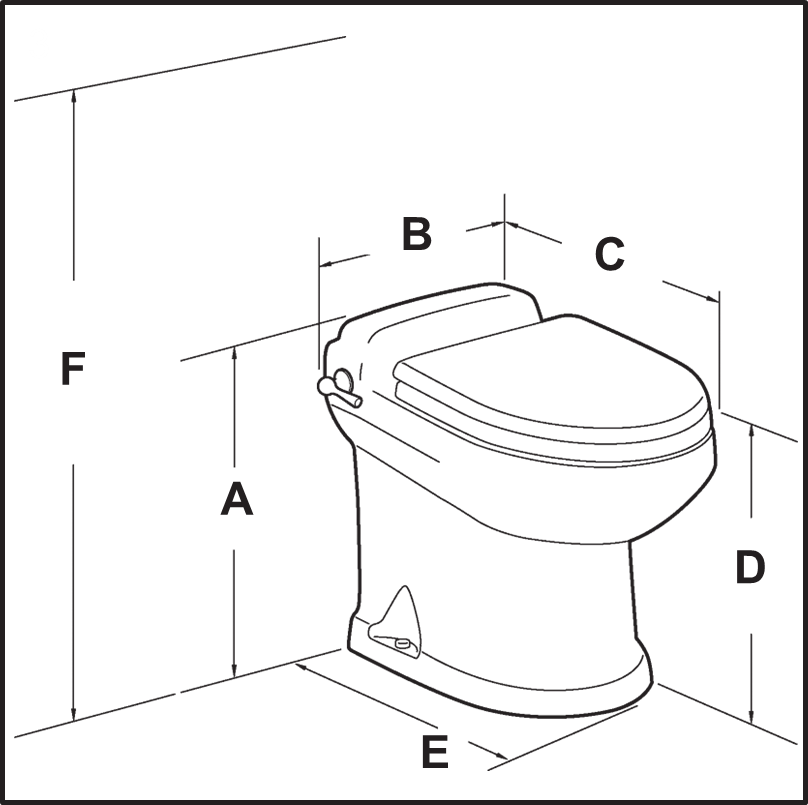
Dimensions
(fig . 3 , page 2)
Models with wall-mounted Models with flush handle
flush touchpad
|
Ref. |
Dimension |
|
Ref. |
Dimension |
|
A |
19 in . / 483 mm |
|
A |
19 in . / 483 mm |
|
B |
14 in . / 356 mm |
|
B |
15 .75 in . / 400 mm |
|
C |
21 .5 in . / 546 mm |
|
C |
21 .5 in . / 546 mm |
|
D |
17 .5 in . / 445 mm - seat height |
|
D |
17 .5 in . / 445 mm - seat height |
|
E |
17 in . / 432 mm |
|
E |
17 in . / 432 mm |
|
F |
33 .5 in . / 851 mm - seat lid up |
|
F |
33 .5 in . / 851 mm - seat lid up |
Operation
Toilet system start-up
1 . Turn on water supply to toilet .
2 . Press “Flush” switch (fig . 4 2) once . After nine seconds of water flow, macerator pump will start and run for about six seconds to clear bowl . It will take about five seconds to refill bowl .
3 . Toss several sheets of toilet paper into bowl and repeat cycle . The bowl should completely clear .
Normal toilet operation - Dometic touchpad or other wall switch
ADDING WATER TO TOILET BOWL
Press “Add Water” switch (fig . 4 1) until desired water level is achieved . (Water flow will shut off automatically if switch is pressed too long to avoid overflow .) More water is usually added only when flushing solids .
FLUSHING TOILET
Press “Flush” switch (fig . 4 2), then release it . This activates a powerful macerator pump that siphons water and waste from the bowl, macer- ates, and propels the effluent through the discharge line to the holding tank .
Caution – Do Not Flush Foreign Objects!
Flush only water, bodily wastes and rapid-dissolving toilet tissue . Do not flush wet wipes, sanitary napkins, condoms, diapers, paper cups, cotton swabs, food, hair or liquids such as oils or solvents as clogging or damage to the toilet or toilet system may occur .
Note
Make sure all guests understand toilet operation before use .
Changing flush modes
Dometic 8700 series MasterFlush toilets offer two flush settings to help manage water consumption:
Normal flush – Uses 0 .85 gal . (3 .2 liters) per flush . Adds water to bowl after every flush .
Dry Bowl flush – Uses 0 .45 gal . (1 .7 liters) per flush . Does not add water to bowl after flush.
To change from Normal to Dry Bowl flush setting, press “Flush” switch for about five seconds. When “Power On” light (fig . 4 3) begins flashing, release “Flush” switch . Flush mode has been changed to Dry Bowl setting . Change mode to Normal flush by following the same procedure .
Indicator lights
“POWER ON” INDICATOR
On the Dometic flush switch panel, a steady green “Power On” light (fig . 4 3) indicates when electrical power to the toilet is activated . A momentary flashing green light indicates when flush mode is changing .
“FULL TANK” INDICATOR
The Dometic flush switch panel includes a red “Full Tank” light (fig . 4 4) to indicate when the holding tank is full (if connected to a tank monitoring system) and should be pumped out . When the red light is illuminated, electrical power to the toilet automatically shuts off to prevent overfill of the holding tank .
Normal toilet operation - Dometic flush handle and status panel 
ADDING WATER TO TOILET BOWL ADD WATER TO BOWL
Lift flush handle until desired water level is achieved . (Water flow will shut off automatically if switch is pressed too long to avoid overflow .) More water is usually added only when flushing solids .
FLUSHING TOILET  FLUSH
FLUSH
Press flush handle down, then release it . This activates a powerful macera- tor pump that siphons water and waste from the bowl, macerates, and propels the effluent through the discharge line to the holding tank . FLUSH
Caution – Do Not Flush Foreign Objects!
Flush only water, bodily wastes and rapid-dissolving toilet tissue . Do not flush wet wipes, sanitary napkins, condoms, diapers, paper cups, cotton swabs, food, hair or liquids such as oils or solvents as clogging or damage to the toilet or toilet system may occur .
Note
Make sure all guests understand toilet operation before use .
Changing flush modes
Dometic 8700 series MasterFlush toilets offer two flush settings to help manage water consumption:
Normal flush – Uses 0 .85 gal . (3 .2 liters) per flush . Adds water to bowl after every flush .
Dry Bowl flush – Uses 0 .45 gal . (1 .7 liters) per flush . Does not add water to bowl after flush .
To change from Normal to Dry Bowl flush setting, press flush handle for about five seconds . When “Power On” light (fig . 5 1) begins flashing, release flush handle . Flush mode has been changed to Dry Bowl setting . Change mode to Normal flush by following the same procedure .
Indicator lights
“POWER ON” INDICATOR
On the Dometic MasterFlush status panel, a steady green “Power On” light (fig . 5 1) indicates when electrical power to the toilet is activated . A momentary flashing green light indicates when flush mode is changing .
“FULL TANK” INDICATOR
The Dometic MasterFlush status panel includes a red “Full Tank” light (fig . 5 2) to indicate when the holding tank is full (if connected to a tank monitoring system) and should be pumped out . When the red light is illuminated, electrical power to the toilet automatically shuts off to prevent overfill of the holding tank .
Maintenance and winterizing
Cleaning the toilet
To maintain the toilet’s original, lustrous appearance, use Dometic Toilet Bowl Cleaner or other non-abrasive bathroom and toilet bowl cleaners . Please follow label directions .
Caution
To avoid damaging internal seals, do not clean toilet with abrasive cleaners, caustic chemicals, or lubricants and cleaners that contain alcohols or petroleum distillates .
Routine maintenance
MONTHLY
1 . Inspect toilet, plumbing, and plumbing connections, wires, and wire connections . 2 . Open and close all plumbing valves, including seacocks .
3 . Check in-line water filters and vented loops for blockage
YEARLY
Check water valve filter . Also check water valve filter if water flow into toilet becomes insufficient .
During extended periods of non-use
The macerator toilet and sanitation hoses should be protected if toilet will not be needed for an extended period of time (more than two weeks, especially in hot weather) .
1 . Flush toilet in “Normal” mode and add 4 oz . (118 ml) of liquid biodegradable laundry detergent (should NOT contain bleach or environmentally harmful substances) . Note: If using sea water for flushing, shut off power to sea water pump and add fresh water by pouring directly into the bowl during the flush cycle .
2 . Flush toilet at least five times . 3 . Turn off water supply to toilet .
4 . Flush the toilet without water . Repeat three times . (This procedure will minimize any remaining water in the macerator pump .)
5 . Turn off power to the toilet .
If system will be subjected to freezing temperatures, please follow above procedure, and then winterize system as described below .
Winterizing
At the end of each season, the Dometic macerator toilet should be winterized for storage by using potable water-safe antifreeze (if boat or vehicle will be exposed to freezing temperatures) .
Note
Use nontoxic antifreeze designated for potable water systems . (See boat or vehicle owner’s manual .)
Caution
Never use automotive-type antifreeze in freshwater systems .
PRESSURIZED FRESH WATER SYSTEM
1 . Drain potable water tank and empty holding tank . 2 . Add freshwater antifreeze to potable water tank .
3 . Flush potable water antifreeze and water mixture through toilet(s) and into entire system, including the waste holding tank, diverter valve connections, discharge pumps, etc . Turn off power to toilet .
Each installation is different, so amounts may vary . User discretion is required to assure adequate protection .
RAW WATER SYSTEM
Parts required:
• 1 .5 in . (38 mm) ID hose, about 3 ft . (1 m) long
• 0 .625 in . (16 mm) ID hose, about 3 ft . (1 m) long
• two containers
1 . Close intake and discharge seacocks . See Hazard of Flooding risks in this manual . 2 . Turn off power to toilet .
3 . Disconnect and drain intake hose, discharge hose, and in-line filters .
4 . Connect 0 .625 in . (16 mm) ID hose to raw water pump intake and 1 .5 in . (38 mm) ID hose to toilet discharge .
5 . Place one container under hose connected to toilet’s discharge .
6 . Place hose connected to intake pump into bucket with antifreeze and pour antifreeze in other container .
7 . Turn on power to toilet and flush until antifreeze is removed from toilet . 8 . Disconnect power to toilet and reconnect all intake and drain hoses .
Troubleshooting
| Problem | Possible Cause | Service Instruction |
| 1 . Flush cycle operates correctly but water in the bowl empties slowly or not at al |
a . Discharge piping is pinched or kinked . b . Discharge piping is too high . (Remember, all upward vertical loops should not exceed a total of 9 .8 feet / 3 m in height .) c . The macerator pump or discharge piping is blocked . |
a . Check discharge piping . b . Reroute discharge piping . b . Reroute discharge piping . c . Close seacocks and clear blockage . |
| 2 . Macerator pump makes unusually loud noise or continually trips breaker . |
a . Foreign material in pump chamber . |
a . Close seacocks and clear foreign material . |
|
3 . Flush cycle is not activated after pushing on flush switch or handle . |
a . Holding tank is full and signal from tank has shut down electrical power to toilet . b . Electrical power to toilet is shut off or disrupted . c . Flush switch is malfunctioning . d . Circuit board in control module is malfunctioning . |
a . Empty holding tank .
b . Check wiring and circuit breakers (or fuses) c . Replace flush switch . d . Replace control module . |
| 4 . Insufficient or no water enters the bowl. |
a . Water supply line is pinched or kinked. b. Screen in water valve is blocked c. Intake water filters are blocked (in raw water system) d. Water valve is malfunctioning. |
a . Check water supply line b. Clear blockage at water valve. c. Clear water filters. d. Replace water valve. |
|
5 . Insufficient water flow during bidet operation . |
a . Clogged inlet screen at hot or cold connection at toilet/bidet mixer valve . b . Clogged aerator in bidet nozzle inside toilet bowl . c . Toilet/bidet mixer valve assembly is not functioning properly . |
a . Disconnect water lines from mixer valve and clean screens . b . Unthread aerator nozzle and clean . c . Replace mixer valve assembly . |
Warranty and product liability
North America and Rest of the World:
Manufacturer’s One-Year Limited Warranty
Dometic Corporation, Sanitation Division warrants to the original purchaser only that this product, if used for personal, family or household purposes, is free from defects in material and workmanship for a period of one year from the date of purchase .
If this Dometic product is placed in commercial or business use, it will be warranted to the original purchaser only to be free of defects in material and workmanship for a period of ninety (90) days from the date of purchase .
Dometic reserves the right to replace or repair any part of this product that proves, upon inspection by Dometic, to be defective in material or workmanship . All labor and transportation costs or charges incidental to warranty service are to be borne by the purchaser-user .
EXCLUSIONS
IN NO EVENT SHALL DOMETIC BE LIABLE FOR INCIDENTAL OR CONSEQUENTIAL DAMAGES, FOR DAMAGES RESULTING FROM IMPROPER INSTALLATION, OR FOR DAMAGES CAUSED BY NEGLECT, ABUSE, ALTERATION OR USE OF UNAUTHORIZED COMPONENTS . ALL IMPLIED WAR- RANTIES, INCLUDING ANY IMPLIED WARRANTY OF MERCHANTABILITY OR FITNESS FOR ANY PARTICULAR PURPOSE, ARE LIMITED TO A PERIOD OF ONE YEAR FROM DATE OF PURCHASE .
IMPLIED WARRANTIES
No person is authorized to change, add to, or create any warranty or obligation other than that set forth herein . Implied warranties, including those of merchantability and fitness for a particular purpose, are limited to one (1) year from the date of purchase for products used for personal, family or household purposes, and ninety (90) days from the date of purchase for products placed in commercial or business use .
OTHER RIGHTS
Some states do not allow limitations on the duration of an implied warranty and some states do not allow exclusions or limitations regarding incidental or consequential damages; so, the above limita- tions may not apply to you . This warranty gives you specific legal rights, and you may have other rights which vary from state to state .
To obtain warranty service, first contact your local dealer from whom you purchased this product or go to http://www .dometic .com to locate a dealer near you .
Europe:
Warranty and Customer Service
Warranty arrangements are in accordance with EC Directive 44/1999/CE and the normal conditions applicable for the country concerned . For warranty or other service, please contact our Dometic Customer Service department . Any damage due to improper use is not covered by the warranty .
The warranty does not cover any modifications to the product or the use of non-original Dometic parts; the warranty does not apply if the installation and operating instructions are not adhered to and no liability shall be entertained .
Product Liability
Product liability of Dometic Group and its subsidiary companies does not include damages which may arise from: faulty operation; improper alterations or intervention in the equipment; adverse effects from the environment which may impact the equipment itself or the direct vicinity of the equipment or persons in the area .
To obtain warranty service, first contact your local dealer from whom you purchased this product or go to http://www .dometic .com for a dealer near you .
Customer service
There is a strong, worldwide network to assist in servicing and maintaining your sanitation system . For the Authorized Service Center near you, please call from 8:00 a .m . to 5:00 p .m . (ET) Monday through Friday .
You may also contact or have your local dealer contact the Parts Distributor nearest you for quick response to your replacement parts needs . They carry a complete inventory for the Dometic product line .
|
Telephone: |
1 800-321-9886 |
U .S .A . and Canada |
|
|
330-439-5550 |
International |
|
Fax: |
330-496-3097 |
U .S .A . and Canada |
|
|
330-439-5567 |
International |
Web site: http://www .Dometic .com
|
Dometic is a customer-driven, world-leading provider of leisure products for the RV, automotive, truck and marine markets . We supply the industry and aftermarket with a complete range of air conditioners, refrigerators, awnings, cookers, sanitation systems, lighting, mobile power equipment, comfort and safety solutions, windows, doors and other equipment that make life more comfortable away from home . Dometic supplies a wide range of workshop equipment for service and maintenance of built-in air conditioners . Dometic also provides specially designed refrigerators for hotel rooms, offices, wine storage and transport and storage of medical products . Our products are sold in almost 100 countries and are produced mainly in wholly-owned production facilities around the world . |
REVISION A Dometic Corporation, Sanitation Division
Form No. 600346367 8/17 13128 State Rt. 226, P.O. Box 38
©2017 Dometic Corporation Big Prairie, OH 44611 USA
1-800-321-9886 • Fax: 330-496-3097